이번에 기상청 api로 간단한 날씨 검색 사이트를 만들어보던 중 지오코딩과 역지오코딩이 필요한 상황이 생겼다.
여기저기 알아보던 중 Nominatim API를 보게 되었고 좋아보여 바로 사용해 보기로 했다.
지오코딩
우선 지오코딩을 보면 값으로 지역값을 전달해주면 되는데
export async function getPlace(address) {
  const url = `https://nominatim.openstreetmap.org/search?q=${encodeURIComponent(address)}&format=json`;
}이런식으로 함수에 파라미터로 받아서 전달해주면 된다.
format은 json을 꼭 해주어야 한다.
여기서 encodeURIComponent은
예를들어 서울특별시 강남구 테헤란로 를 검색하려고 할때 URL에 문자열을 넣으면
서울특별시%강남구%테헤란로
이런식으로 나오게 될 것이다.
이것을 제대로 잘 나오도록 해주는 것이다.
그렇게 해서 값을 받아오면
{
    "data": [
        {
            "place_id": 197296024,
            "licence": "Data © OpenStreetMap contributors, ODbL 1.0. http://osm.org/copyright",
            "osm_type": "node",
            "osm_id": 5927529147,
            "lat": "37.4979497",
            "lon": "127.0275574",
            "class": "railway",
            "type": "station",
            "place_rank": 30,
            "importance": 0.40898930833454095,
            "addresstype": "railway",
            "name": "강남",
            "display_name": "강남, 테헤란로, 역삼1동, 강남구, 서울, 06615, 대한민국",
            "boundingbox": [
                "37.4929497",
                "37.5029497",
                "127.0225574",
                "127.0325574"
            ]
        },
        {
            "place_id": 197012575,
            "licence": "Data © OpenStreetMap contributors, ODbL 1.0. http://osm.org/copyright",
            "osm_type": "node",
            "osm_id": 8793714495,
            "lat": "37.4964624",
            "lon": "127.0282667",
            "class": "railway",
            "type": "station",
            "place_rank": 30,
            "importance": 0.40898930833454095,
            "addresstype": "railway",
            "name": "강남",
            "display_name": "강남, 강남대로, 서초2동, 서초구, 서울, 06621, 대한민국",
            "boundingbox": [
                "37.4914624",
                "37.5014624",
                "127.0232667",
                "127.0332667"
            ]
        },
        {
            "place_id": 205400801,
            "licence": "Data © OpenStreetMap contributors, ODbL 1.0. http://osm.org/copyright",
            "osm_type": "node",
            "osm_id": 8808822187,
            "lat": "37.497112",
            "lon": "127.0279352",
            "class": "railway",
            "type": "stop",
            "place_rank": 30,
            "importance": 0.00000999999999995449,
            "addresstype": "railway",
            "name": "강남",
            "display_name": "강남, 강남대로, 서초2동, 서초구, 서울, 06181, 대한민국",
            "boundingbox": [
                "37.4970620",
                "37.4971620",
                "127.0278852",
                "127.0279852"
            ]
        },
        ...
    ],
    "status": 200,
    "statusText": "",
    "headers": {
        "content-length": "3752",
        "content-type": "application/json; charset=utf-8"
    },
    "config": {
        "transitional": {
            "silentJSONParsing": true,
            "forcedJSONParsing": true,
            "clarifyTimeoutError": false
        },
        "adapter": [
            "xhr",
            "http"
        ],
        "transformRequest": [
            null
        ],
        "transformResponse": [
            null
        ],
        "timeout": 0,
        "xsrfCookieName": "XSRF-TOKEN",
        "xsrfHeaderName": "X-XSRF-TOKEN",
        "maxContentLength": -1,
        "maxBodyLength": -1,
        "env": {},
        "headers": {
            "Accept": "application/json, text/plain, */*"
        },
        "baseURL": "https://apis.data.go.kr/1360000/VilageFcstInfoService_2.0",
        "method": "get",
        "url": "https://nominatim.openstreetmap.org/search?q=%EA%B0%95%EB%82%A8&format=json"
    },
    "request": {}
}
좀 길긴한데 이런식으로 오게 된다.
여기서 내가 필요했던 것은 위도 경도이기 때문에 난 0번의 값을 가져다 사용하기로 했다.
export async function getPlace(address) {
  const url = `https://nominatim.openstreetmap.org/search?q=${encodeURIComponent(address)}&format=json`;

  try {
    const response = await axios.get(url);
    console.log(response);
    const box = { x: response.data[0].lat, y: response.data[0].lon };
    return box;
  } catch (error) {
    console.error("Error fetching place name:", error);
    return "";
  }
}
최종적으로는 이런 코드가 나오게 되었다.
역지오코딩
역지오코딩은 위도,경도를 값으로 주면 좌표계를 얻게 되는 것이다.
그래서 이는
export async function getPlaceNameByOSM(latitude, longitude) {
  const url = `https://nominatim.openstreetmap.org/reverse?format=json&lat=${latitude}&lon=${longitude}`;
}이런식으로 설정을 해주게 되었다.
이 경우에는
{
    "data": {
        "place_id": 229033787,
        "licence": "Data © OpenStreetMap contributors, ODbL 1.0. http://osm.org/copyright",
        "osm_type": "node",
        "osm_id": 5927529147,
        "lat": "37.4979497",
        "lon": "127.0275574",
        "class": "railway",
        "type": "station",
        "place_rank": 30,
        "importance": 0.40898930833454095,
        "addresstype": "railway",
        "name": "강남",
        "display_name": "강남, 테헤란로, 역삼1동, 강남구, 서울, 06134, 대한민국",
        "address": {
            "railway": "강남",
            "road": "테헤란로",
            "suburb": "역삼1동",
            "borough": "강남구",
            "city": "서울",
            "ISO3166-2-lvl4": "KR-11",
            "postcode": "06134",
            "country": "대한민국",
            "country_code": "kr"
        },
        "boundingbox": [
            "37.4929497",
            "37.5029497",
            "127.0225574",
            "127.0325574"
        ]
    },
    "status": 200,
    "statusText": "",
    "headers": {
        "content-length": "668",
        "content-type": "application/json; charset=utf-8"
    },
    "config": {
        "transitional": {
            "silentJSONParsing": true,
            "forcedJSONParsing": true,
            "clarifyTimeoutError": false
        },
        "adapter": [
            "xhr",
            "http"
        ],
        "transformRequest": [
            null
        ],
        "transformResponse": [
            null
        ],
        "timeout": 0,
        "xsrfCookieName": "XSRF-TOKEN",
        "xsrfHeaderName": "X-XSRF-TOKEN",
        "maxContentLength": -1,
        "maxBodyLength": -1,
        "env": {},
        "headers": {
            "Accept": "application/json, text/plain, */*"
        },
        "baseURL": "https://apis.data.go.kr/1360000/VilageFcstInfoService_2.0",
        "method": "get",
        "url": "https://nominatim.openstreetmap.org/reverse?format=json&lat=37.4979497&lon=127.0275574"
    },
    "request": {}
}이런식으로 받아오게 된다.
이걸 가지고 자신이 필요한 정보에 따라 잘받으면 될 것이다.
난 지역 이름이 필요했기 때문에 아래와 같이 완성을 하게 되었다.
export async function getPlaceNameByOSM(latitude, longitude) {
  const url = `https://nominatim.openstreetmap.org/reverse?format=json&lat=${latitude}&lon=${longitude}`;

  try {
    const response = await axios.get(url);
    console.log(response);
    const { city, town } = response.data.address;
    return `${city} ${town}`;
  } catch (error) {
    console.error("Error fetching place name:", error);
    return "";
  }
}
나중에도 지오코딩 역지오코딩이 필요하면 또 찾을것 같다.
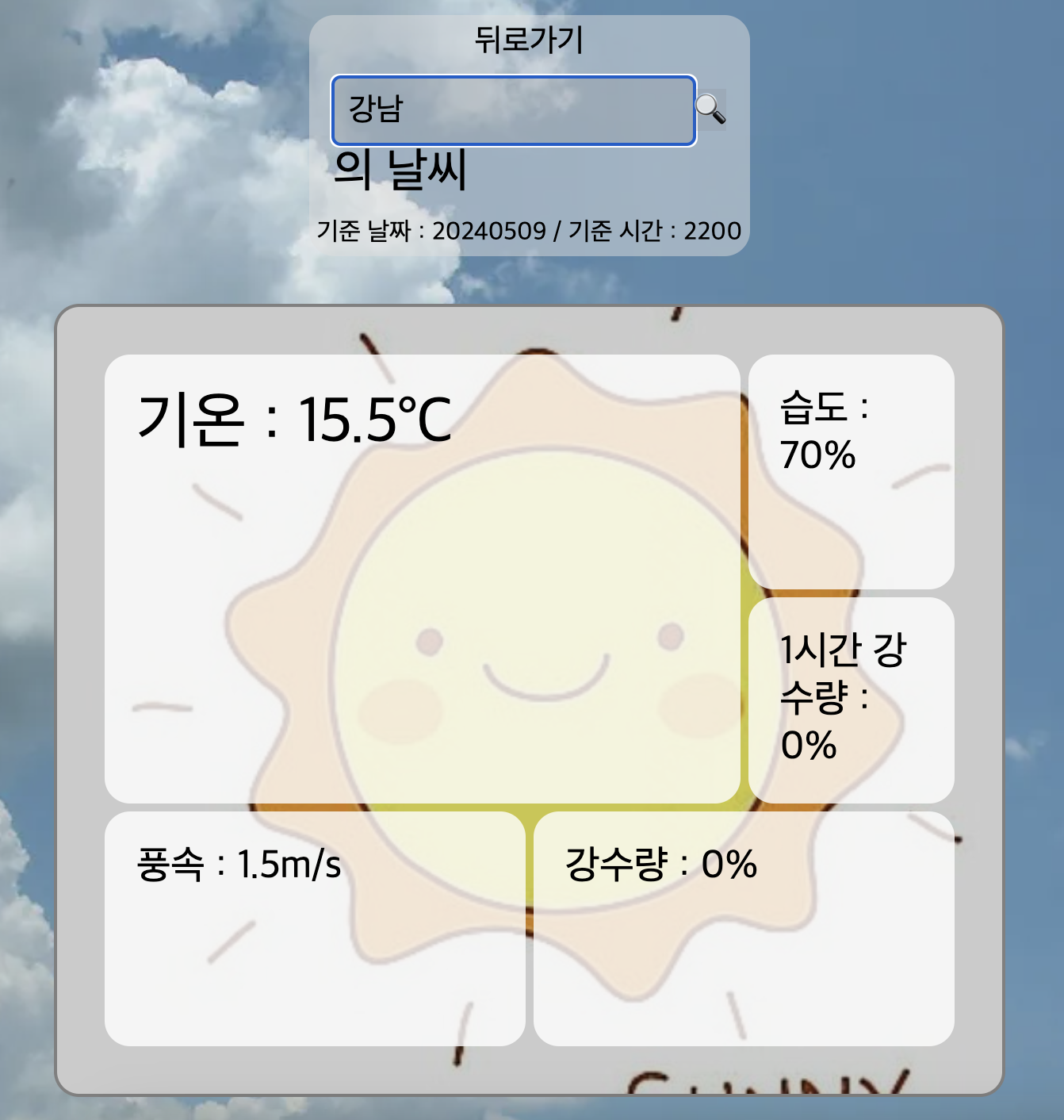
아직 더 만져봐야 하지만 이런식으로 나오게 만들었다.
https://nalcyun.netlify.app/nalcnow
NalC
날씨를 알아보자
nalcyun.netlify.app
처음에는 지오코딩 역지오코딩이 무조건 라이브러리를 사용해야 하는건줄 알았는데 그것은 아니라는 것에 놀라웠다.
이전에 프로젝트에서 다른분이 사용한걸 한번 보긴 했는데 그때는 그냥 그렇구나~ 하고 넘겼다가 직접 해보니 생각보다는 쉬우면서 흥미로웠다.
'이것저것' 카테고리의 다른 글
| pm2 알아보기 (0) | 2024.05.22 |
|---|---|
| padStart와 padEnd (JS) (0) | 2024.05.18 |
| css를 사용하며 (풀스크린..?) (0) | 2024.04.30 |
| 눈 내리는 효과 (React) (0) | 2024.04.22 |
| Mixed Content (Next.js) (0) | 2024.04.19 |